Showing posts with label Reader. Show all posts

04 August 2023

The Verge: “How Google Reader died — and why the web misses it more than ever”

Google’s bad reputation for killing and abandoning products started with Reader and has only gotten worse over time. But the real tragedy of Reader was that it had all the signs of being something big, and Google just couldn’t see it. Desperate to play catch-up to Facebook and Twitter, the company shut down one of its most prescient projects; you can see in Reader shades of everything from Twitter to the newsletter boom to the rising social web. To executives, Google Reader may have seemed like a humble feed aggregator built on boring technology. But for users, it was a way of organizing the internet, for making sense of the web, for collecting all the things you care about no matter its location or type, and helping you make the most of it.


Reader appealed primarily to information junkies, who wanted a quick way to keep up with all their favorite publications and blogs. (It turned out there were two types of Reader users: the completionists, who go through every unread item they have, and the folks who just scroll around until they find something. Both sides think the other is bonkers.) The team struggled to find ways to bring in more casual users, some of whom were put off by the idea of finding sites to subscribe to and others who simply didn’t care about reading hundreds of articles a day.

David Pierce

Good recap of the (struggling) life and (untimely) death of Google Reader, 10 years after its shutdown. However the narrative that Google Reader was on the verge of becoming ‘something big’ repeats the same fallacy that most tech products fall trap to sooner or later: if the engineers that passionately built the product and its highly engaged first adopters both love it, surely everyone else can’t wait to experience it as well, right?!

20 May 2021

TechCrunch: “Google revives RSS”

Chrome, at least in its experimental Canary version on Android (and only for users in the U.S.), is getting an interesting update in the coming weeks that brings back RSS, the once-popular format for getting updates from all the sites you love in Google Reader and similar services.

In Chrome, users will soon see a “Follow” feature for sites that support RSS and the browser’s New Tab page will get what is essentially a (very) basic RSS reader — I guess you could almost call it a “Google Reader”.

Now we’re not talking about a full-blown RSS reader here. The New Tab page will show you updates from the sites you follow in chronological order, but it doesn’t look like you can easily switch between feeds, for example. It’s a start, though.

Frederic Lardinois

An unexpected update from Google, considering how long they have neglected RSS since shutting down Google Reader. Maybe someone has finally decided to offer a product to compete with Twitter and Facebook, to attract people who are unsatisfied with algorithmic newsfeeds and are asking for a simple, chronological solution.

28 September 2015

Scripting News: “Facebook uses RSS for Instant Articles”

Late yesterday Facebook released docs explaining how Instant Articles works for publishers. It's good news. They have, as I speculated earlier, built their system around RSS. This means there can be interop between all the big companies --Twitter, Google, Apple, Facebook -- now building new news systems.


To publishers and bloggers -- this is a big deal because it means that the same feeds you generate to post stories to Facebook can be used for other sites. It's a very strong statement. No publishing silos. Let news flow where it wants to. And let competitors arise who may do more interesting and useful things with news than the big companies can.

Dave Winer

Ironic how two of the companies infamous for their ‘walled gardens’ – Facebook and Apple – are using open standards for their news products, while the ‘open’ Google couldn’t figure out a practical use for RSS and simply abandoned it for the past few years.

21 March 2014

Moving away from another Google service, FeedBurner

The shutdown of Google Reader last year made if painfully clear: there are no guarantees that free services will continue to be supported, even if they belong to large corporations like Google. Leadership changes, plans and priorities shift from year to year and some products will end up abandoned, even if they are very important to many people. That seems to be the case with FeedBurner as well; the API has been discontinued a while ago, they don’t have a blog or Twitter account anymore and some people started reporting disruptions in the service. One could say it’s surprising it lasted that long. In any case, I decided not to wait around for the service to be officially closed and to find alternatives for my blog.

There are three main tasks I used FeedBurner for: feed delivery and statistics, email subscriptions and social sharing. While there are plenty of paid solutions for the first two, blogging is just a hobby to me and I don’t have massive amounts of traffic, so it makes no sense to go for a paid-only service like FeedBlitz. After searching around, I settled for FeedPress, which offers a free version with sufficient features for my current needs.

12 March 2014

Feedbin Blog: “Feedbin’s First Year”

RSS fountain

I built Feedbin because I still loved RSS but I didn’t like Google Reader. It looked like it had been abandoned after the last update in 2011 that attempted to prop up Google+ by removing many features.

The goal was to be able to cover costs in one year. Instead it took three weeks. It cost about $170/month to run Feedbin when it launched and with $1.62/user/month in profit after credit card fees it looked like I would need just over 100 customers who were also looking for a Google Reader alternative.

Ben Ubois

Three weeks to break even for a startup built by a single developer. Let that sink in for a minute and think about how a huge company like Google failed to support a product that one person rebuilt from scratch. And don’t think for a moment Feedbin in inferior to Google Reader in some way: between fast search with powerful operators, PubSubHubbub support and the ‘Recently Read’ section, over the past year Feedbin added basically all the best features of Reader – and some more! With every new feature, Feedbin proves I made the right decision choosing it as my new RSS reader last year.

17 December 2013

MakeUseOf: “Feedly Was Stealing Your Content – Here’s the Story, And Their Code”

Basically, Feedly went about creating a kind of slimmed down reading experience, but the way they went about it — rewriting links to propagate their own service through subsequent social shares was pretty damned disgusting. This isn’t the only bad move Feedly has made recently either – last month, they began requiring log in with Google+ accounts (having seen how well Google+ login is working for YouTube, I guess), but that too was quickly reverted. The lesson is — you might want to start finding an alternative feedreader, unless you were already suckered into paying $99 for a Pro account. James Bruce

One more reason to be glad I didn’t choose Feedly as my Google Reader replacement. As Feedly continues to stumble, introducing and then quickly reverting weird, customer-unfriendly decisions, other feed readers are quietly and constantly improving. Six months later I’m just as happy about my choice as I was back then – if not happier. Feedbin is getting better with each new feature and others have noticed this too.

08 November 2013

After Google Reader, subscriber counts largely unaffected

I’ve been planning to write this post for months now, but other more pressing stuff kept coming up. After announced it’s shutting down Reader, one of the fears of publishers was that they would loose readers, if they failed to migrate their subscriptions to new services. Some people already investigated the evolution of subscribers on their sites after Reader’s cut-off date, and it seems that people managed to move in time to other services, with the bulk heading to Feedly, and in some cases the subscriber count is even on the rise. I did a similar check for my blog using the data provided by .

Now, my blog is far from most popular, with only a couple hundreds subscribers, and FeedBurner doesn’t exactly provide perfect results, but that’s going to have to do. At least the data is easy to export in an Excel-friendly format. First, you can see below the evolution of subscribers from the time I have enabled FeedBurner until the second half of October. Because it’s a long time frame to display on a graph for daily counts – over four years – I have plotted here only the weekly average for subscribers; this also has the advantage of smoothing out some of the variances in FeedBurner’s statistics. You can clearly see the sudden dip back in 2011 when FeedBurner stopped reporting FriendFeed followers, that cut the numbers for this blog almost in half.

20 August 2013

Easily follow websites with SubToMe

SubToMe makes it easy for people to follow web sitesWhile Google Reader’s shutdown caused a boom on the market for RSS clients, the multitude of options caused other unfortunate side-effects. One of the problems is discovering the feed of a website and adding it to your reader. Until recently Reader was integrated into the major browsers (well, in and by default and in through an extension); with it gone, browsers have reverted to their local subscription methods, which is not very helpful for users who adopted cloud-based solutions. Adding support for these new RSS readers is not exactly easy, requiring manual configuration both in Firefox and in Chrome’s RSS extension. Bookmarklets are another option, if you know where to look or how to build one.

31 July 2013

The Old Reader behind the scenes: “Desperate times call for desperate measures”

We would really like to switch the difficulty level back to “normal”. Not to be dreaded of a vacation. Do something else besides The Old Reader. Stop neglecting ourselves. Think of other projects. Get less distant from families and loved ones. The last part it’s the worst: when you are with your family, you can’t fall out of dialogues, nodding, smiling and responding something irrelevant while thinking of refactoring the backend, checking Graphite dashboard, glancing onto a Skype chat and replying on Twitter. You really need to be there, you need to be completely involved. We want to have this experience again.

That’s why The Old Reader has to change. We have closed user registration, and we plan to shut the public site down in two weeks. We started working on this project for ourselves and our friends, and we use The Old Reader on a daily basis, so we will launch a separate private site that will keep running. It will have faster refresh rate, more posts per feed, and properly working full-text search — we are sure that we can provide all this at a smaller scale without that much drama, just like we were doing before March.

Elena Bulygina & Dmitry Krasnoukhov

Even though has been officially dead for a month now, the drama caused by its demise continues. The Old Reader, one of the earliest alternatives, will (maybe) close down for the public in the coming weeks. I can certainly understand the two developers feeling completely overwhelmed and wanting some proper work-life-balance. I’m somewhat curious if anybody will take up their offer for an acquisition; to me it seems unlikely: the bigger tech companies have no interest in RSS anymore, the competitors already have their own products in place, so there is no reason to keep two RSS readers running, competing for resources and users.

23 July 2013

BuzzFeed: “Google Reader Died Because No One Would Run It”

The decision had little to do with consumers – the RSS reader was very popular with a core set of power users – and much more to do with corporate politics. At Google, Chief Executive Larry Page and his inner circle of lieutenants, known as the “L Team”, simply did not view Google Reader as an important strategic priority. Internally, it became obvious that despite Google Reader’s loyal fan base, working on the project was not going to get the attention of Page, several sources close to the company told BuzzFeed.

Matthew Lynley

Sad, but not really surprising. When corporate politics start to take precedence over innovation and customer satisfaction, that’s when you know the company’s good days are behind it.

01 July 2013

Farewell, Google Reader! Hello, …?

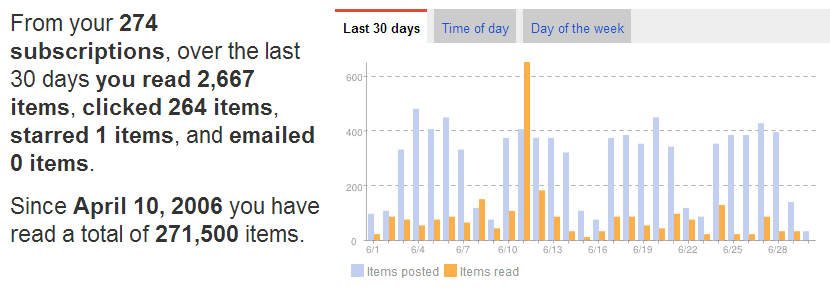
With a simple whimper, today was retired, ending a long era. I’m not going to repeat what I wrote as I first heard the news, not much has changed since and I don’t feel the strength to say more. Like many others, I’m going to miss Reader after using it basically every day for the past 7 years. I never did hit the magic mark of 300,000 read items after consuming more than 100 articles a day on average… Google Reader final statistics

I’ve come to rely on Google Reader for inspiration, motivation, education, news and sustenance. And for a long time, I couldn’t imagine life without it. But now that Google Reader’s dumped me (does it hurt more or less that it wasn’t for someone or something better?), what’s next?

Kevin Skobac

30 June 2013

Looking for the new Google Reader? You should check out Feedbin

I tested – and reviewed – several apps trying to find the best replacement (or shall we say the one that sucks less) and Feedbin is one of the better options. It was launched just a couple of months ago, almost at the same time announced the death of Reader. Unlike other services I tried, it’s a paid service for either 2$/month or 20$/year, but that seems like a small amount compared to the time wasted searching a new service and migrating (some) data after Google Reader closes, so hopefully this won’t happen here.

The design is very spartan – and that’s a good thing! – with muted colors and a classical inbox-like layout: the subscription list to the left, the items in the selected feed in the middle and the current article on the right. I would prefer the two-column layout of Google Reader and its clones to have more space for reading the article, but on wide screens that’s not such a big issue. You can also resize the columns when needed. As with Digg’s Reader I would like to see more color in some places, especially to highlight active buttons or options (for example stars should be more prominent for starred articles), but this can be easily fixed either by the developer or by myself with a custom CSS style.

26 June 2013

Digg Reader has arrived and it’s really… beta!

Digg Reader sign in with GoogleWith only a couple of days to spare until shuts down, Digg has finally released their own alternative. Since I was among the people responding to their surveys about how the final product should look like, I got early access this morning. I’ll present some of my initial observations here; a more thorough presentation can be found on TechCrunch.

Digg Reader does a couple of things right, maybe better than the current competition. The design is clean and light, very similar to Google Reader, with lots of breathing space – maybe a little too much. There is a conspicuous white column on the right, but as soon as you move the mouse over there you see the space is reserved for the action buttons, which is much better than clipping article titles and moving things around all the time – the distracting way Feedly does things. The basic actions are found there: digg (like), save (star) – you can optionally configure a read-it-later service as well – and share, although sharing is currently limited to only and . If you digg or save a story, the button icon becomes permanent, so you can quickly scan the list and see which items you saved. On the left side of the date there is a smaller column, where Digg displays the popularity of the story with a couple of orange dots (from zero to three). If this Reader gains more users, the indicators should become more and more accurate and help users select popular articles in high-volume feeds. Digg also migrates up to 1000 starred items from Reader, which is better than most other services – Feedly only manages 250 from what I remember. I probably have a couple hundreds starred items, so this is an area where Digg clearly wins. But I’m still manually migrating them to delicious just to be sure.

22 June 2013

Another Google Reader “alternative”: The Old Reader

The Old Reader is a project started about a year ago after the original Reader took its first blow from Vater . Naturally, now that Reader will soon be shut down, all alternatives have gained more visibility as RSS users try to find a new app for their reading needs. Unfortunately the current version is still far away from competing even with a stripped down Reader on features.

My overall impression of the webapp is that the team focused too much on recreating the old sharing in Reader and neglected other aspects that are much more important nowadays. The interface is very similar to Reader, with the subscription panel on the left, a home page with links to recent content, tips and updates from the Old Reader team. It has a no-frills list view for items and a greenish theme I don’t particularly like, but that’s not really an issue long-term, it could be easily fixed with custom CSS in the browser. The bigger problems, as I mentioned, are in terms of functionality:

Wired: “Inside Digg’s Race to Build the New Google Reader”

One thing I’ve noticed playing around with all these other readers is that they’re mostly pretty crappy onboarding experiences, McLaughlin said at a meeting in early April. They needed to make onboarding – just the process of getting your feeds out of Google and into Digg – super easy. Mat Honan

Yes, sadly true. From my own experience searching for a alternative, none of the services I tried (Feedly, The Old Reader, Feedbin) manages to migrate the read/unread status of items from Reader or import the lofty archives of stared and shared items. Even Feedly, currently the best alternative overall has announced that after migration to their new cloud the unread counts will be reset… I’m looking forward to see if Digg has done better on this front, a lot of people are still looking for the optimal solution. And if feels like new alternatives are being announced every week, for example one from AOL!

20 May 2013

So I gave Feedly a try…

Feedly-for-Chrome-subscriptions-panelLong story short, I uninstalled it after about 15 minutes. I tried it a couple of times before and never got along with their ‘design-overload’. Unfortunately nothing has changed since:

  • Every where you turn there is an animation in the way: hover over articles in ‘Title view’ and a row of sharing icons slide in from the right. There are animations when you open and close articles, when you hover over the menu button, when you expand categories. Of course, there is no way to turn all these distractions off.
  • Speaking of sharing icons, why do we need them in title view? Am I supposed to share articles without reading them? I can already do that on Twitter, I don’t need a RSS reader for it.
  • The most annoying interface decision for me is hiding the subscriptions panel. I switch between feeds dozens of times a day and in Google Reader this takes just a click. In Feedly on the other hand I need to hover over the menu, expand the category I want and then open a feed – that’s two or three actions every time I want to read something else! Or I could go to the ‘Index’, but that’s inconveniently placed at the bottom of the panel, so I would have to scroll all the way there and it would still take three clicks every time.
    I noticed later that the panel stays visible if you maximize the browser window. But that makes absolutely no sense, it’s just another example of bad experience for the sake of pretty design. When you expand full articles, they are confined to the center of the screen anyway, so there would be plenty of room to show the left panel all the time. I suspect some eager designer wanted to slap on a nice piece of ‘responsiveness’ without thinking about how people actually use the product.
  • I also dislike how Feedly implemented the subscription list: if you have just a couple of feeds in a category you will see read feeds together with unread ones – which is useless, since I rarely want to check sources with no new articles. If you have many more feeds you get a link with ‘x more sources’ at the bottom that reveals – surprise! – feeds with no new items! I can’t see any logic behind this, read sources can be easily found in ‘Index’, there is no need to take up space here!

Feedly may have a nice-looking user interface, but the user experience is lousy. If this is the best replacement, I would rather move to and save myself the headaches. Fortunately Google Reader still has about a month to live and I hope to see the Digg alternative launched by then. Or I could start paying 2$/month for Feedbin, who looks much closer to the simple and efficient Reader experience than Feedly.

02 April 2013

Building Feedly: “Announcing the New Feedly Mobile”

We’ve had two crazy, wonderful weeks at Feedly. Over 3 million new users have joined Feedly since the announcement of the retirement of Google Reader. We are thankful that so many Reader refugees have chosen Feedly for their new home, and are adding hardware as quickly as we can to make that transition as seamless as possible. Your Feedly Team

This is one of those rare cases where it pays to read the comments:

Did you remove the ability to search just your own feeds? This is a feature I use all the time to find articles I’ve read or glanced at in the past, and it seems to have gone missing with the latest update. Brad Linder
Where has the ‘send by email’ button gone? :( hazclan13

Silently removing features: not the best way to build trust! Feedly has certainly gained a lot of attention – and users – in the wake of Reader’s demise, but those refugees could be gone the next day if they don’t handle this properly – and if, by some miracle, a viable alternative emerges.

I for one I’m not not moving anywhere yet; there are still three months to go and I plan to try out several services before committing to a migration. I am glad Newsify is planning to stick around, so at least I will have a far better mobile app than Feedly. Newsify had offline reading since the launch (not to mention the much wider variety of sharing options) and recently introduced local search, something that Feedly apparently is just now beginning to work on…

25 March 2013

AllThingsD: “Another Reason Google Reader Died: Increased Concern About Privacy and Compliance”

But the shutdown wasn’t just a matter of company culture and bigger priorities, sources said. Google is also trying to better orient itself so that it stops getting into trouble with repeated missteps around compliance issues, particularly privacy.

That means every team needs to have people dedicated to dealing with these compliance and privacy issues — lawyers, policy experts, etc. Google didn’t even have a product manager or full-time engineer responsible for Reader when it was killed, so the company didn’t want to add in the additional infrastructure and staff, the sources said. Liz Gannes

This must be the lamest excuse for shutting down a product I’ve heard in a while! If was so deeply integrated into Google Apps, why not just use the policy experts for Google Apps to oversee Reader as well? Also why would every team need dedicated experts after unified the privacy policies of most services last year? Sorry, but I don’t buy this for one second!

16 March 2013

The saddest news of the year: Google Reader is no more

So the moment is finally coming: Google is shutting down Reader in July. It’s not like we didn’t expect this from the lack of attention over the last couple of years and from several disclosures from former developers, but that doesn’t make it any easier. Reader is one of my most used Google services, along with search and YouTube; compared by the time spent Gmail is pretty far behind, and Calendar even further. I’ll freely admit I use it less frequently lately, as I am discovering more stuff on Twitter and on other interest-based news reading apps like Wavii and Prismatic; but somehow I always come back to Reader, either on the desktop or in the awesome iOS app Newsify.

It’s not that hard to understand why: Reader and the RSS protocols behind it offered the right mix of efficiency, control and flexibility in a minimalistic interface. Efficiency because you could skim hundreds of headlines in a matter of minutes; control because you could choose what articles to read, when and where; flexibility because Reader could accommodate anything from high-volume feeds like TechMeme to obscure blogs, comments and notifications in a single place. And if you want more reasons, you can find hundreds in this thread started by a Googler. All this makes it challenging at best to find a good replacement. Social networks, be it , or Google+, are accessible pretty much anywhere, but the feeds are flooded with random updates and setting up a sensible system for tracking specific sources would be time-consuming. Specialized news apps are usually confined to a mobile OS or specific browsers limiting their reach. They’re too interested in boasting their shiny new interfaces to care about the actual content that should be front and center. Also you would be relinquishing much of the control over what you see: in most cases – and depending on how good the algorithms are – less frequent updates from specialized blogs will be lost in a sea of posts from big publishers and slowly, but surely, lose their audience.

03 July 2012

Native audio controls in Google Reader

There doesn’t seem to be much going on with Google Reader after the misguided feature cut caused by the “integration” with Google Plus. The latest blog post is from late October last year and they also haven’t updated their Twitter account since then. I only noticed a couple of days ago that they changed the built-in player used for enclosed music files. Instead of the Flash-based solution used until recently, the new player uses native HTML5 audio controls, probably in browsers who support the feature – I currently use Google Chrome and I don’t have other compatible browsers to test. I suppose this move comes in the wake of Adobe retiring Flash support for Android, but curiously the mobile version of Google Reader doesn’t show music files in podcasts at all… Native audio controls in Google Reader

The feature is still work-in-progress and has some bugs as reported by several users on Twitter. For example if you use ‘Popout’, the player doesn’t work in the new window; the controls show up, but are unresponsive. The volume control could use a bit of redesigning as well, because it’s too small and you cannot change the volume without completely muting, except if you go into full-screen mode. In any case, it’s nice to see Google hasn’t forgotten Reader completely…